



Your OEM customer’s supplier portal flags a new request. Eighteen part numbers. Scope 3 emissions for automotive suppliers, delivered as Product Carbon Footprint data, formatted to the Catena-X PCF Rulebook, with a Data Quality Rating attached. Due in three weeks.
You forward it to whoever handles sustainability. Nobody has set up a Catena-X connector before.
This is the reality for automotive suppliers right now. The requests are real. The deadlines are real. Catena-X exists because no OEM wants to run a central database for this, and no supplier wants to send the same spreadsheet to a dozen customers in a dozen different formats.
This guide explains what that request actually means, how Catena-X moves the data once you have it, and how to respond without building a connector from scratch.
What Are Scope 3 Emissions for Automotive Suppliers?
Definition: Scope 3 Emissions for Automotive Suppliers For a supplier, this isn’t your own emissions inventory. It’s the Product Carbon Footprint (PCF) of what you sell, measured per product, that feeds your customer’s Scope 3 Category 1 reporting under the GHG Protocol’s Corporate Value Chain Standard.
When an OEM asks for “Scope 3 data,” they almost always mean a PCF for the parts you supply, not a full corporate emissions report. Increasingly, they expect it delivered through Catena-X rather than a spreadsheet, formatted to the Catena-X PCF Rulebook, which itself is built on the WBCSD PACT Pathfinder Framework.
Why Catena-X, and Why Now?
Dozens of OEMs and thousands of suppliers now need the same kind of PCF data, on different schedules, and spreadsheets don’t scale to that. Every Tier 1 ends up maintaining a different template for every OEM it sells to, and every Tier 2 ends up doing the same one level down. Regulatory reporting pressure on large OEMs adds to the volume, but the core problem is scale: too many requests, too many formats, and no shared system to run them through.
Catena-X exists because no single company, not even the largest OEM, wants to run the central database a normal shared platform would require. Each participant keeps its own data and runs a connector that handles authentication, contract negotiation, and the transfer itself, directly with the other party, with no third party in the middle.
Why Data Quality Matters for Acceptance
Sending a number isn’t the hard part. Sending one your OEM will actually accept is. The Catena-X PCF Rulebook scores every submission on two things: how closely the underlying data reflects your real production, rather than a generic industry average, and how much of it comes from your own activity data rather than secondary databases. These are known as the Data Quality Rating (DQR) and Primary Data Share (PDS), and they’re tracked through the Catena-X network itself, not something a calculation tool hands you automatically. A spend-based estimate might pass a first review, but it’s worth knowing upfront that OEMs pay closer attention to both scores every year.
How Data Actually Moves Through Catena-X
There is no Catena-X server holding your data. Each participant runs a connector, an Eclipse Dataspace Connector, that publishes a catalog entry describing what it can share, negotiates a usage contract with the requesting partner, and transfers the data directly between the two connectors. The data never passes through a third party.
Authentication runs on a Business Partner Number, issued during onboarding, so both sides know exactly who they’re dealing with before anything moves. The contract negotiation step is what enforces usage policy, an OEM can be granted access to a PCF value without the right to redistribute it, and the connector enforces that automatically instead of relying on a legal clause nobody checks.
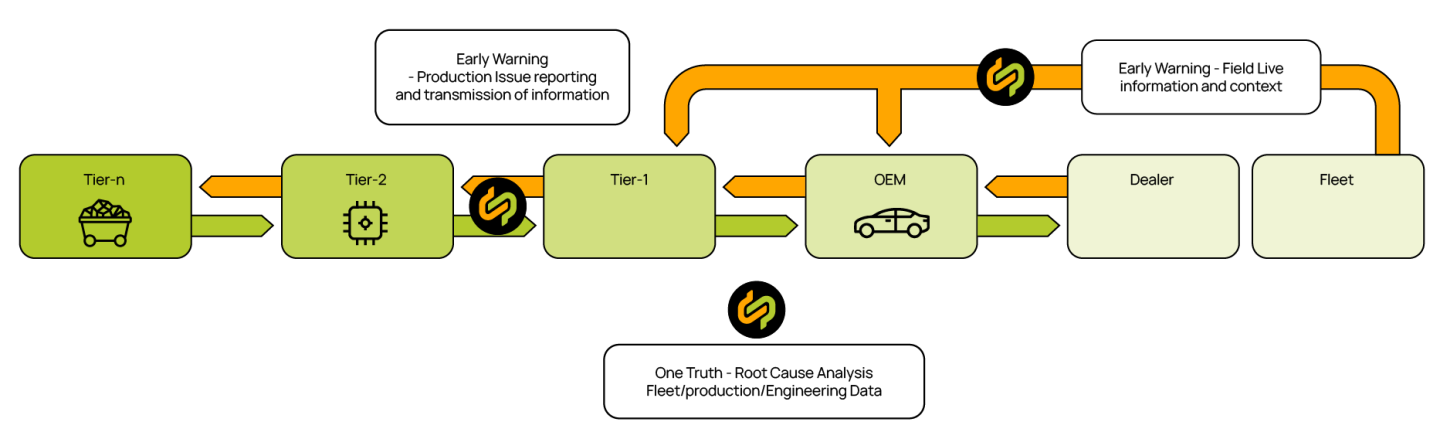
Source: Catena-X Automotive Network, [Use Case – Catena-X].
How CircularTree Can Help
CircularTree offers two ways to handle this, depending on whether you already have the PCF data or still need to calculate it.
1. PACIFIC: Send PCF Data Through Catena-X
PACIFIC is a PCF application available directly in the Cofinity-X App Store. If you’re not yet onboarded to Catena-X, a structured web form lets your OEM receive a usable, rulebook-aligned PCF without you standing up a connector first. Once you’re onboarded through Cofinity-X with a Business Partner Number, the same data moves through the network directly, connector to connector, for every request after that. Best for: Automotive suppliers whose OEM customers are requesting PCF data through Catena-X. → circulartree.com/pacific
2. CarbonMatch: Calculate the PCF First
If the footprint doesn’t exist yet, CarbonMatch handles the calculation side. It matches your bill of materials components against emission factor databases so you can see where the carbon is concentrated in a product, instead of starting from a blank spreadsheet. Best for: Suppliers who need to calculate a PCF before they have anything to send. → circulartree.com/scope-3-emissions
Responding to Your First OEM Request
1. Join the Catena-X network through Cofinity-X. This is a one-time step, a few business days to get your Business Partner Number, and you don’t repeat it for every OEM that asks afterward.
2. Get a trusted app from the Cofinity-X App Store. PACIFIC is listed there directly. Setup is same-day once your Business Partner Number is active, and you’re running a rulebook-compliant connector without building or maintaining one yourself.
3. Upload your PCF data and company certificates, then respond. Two to four hours per product family for the first submission. Your OEM receives a verified, certificate-backed PCF, and if you’re a Tier 1, the same setup lets you push the same request down to your own suppliers.
Two common mistakes worth avoiding: uploading a PCF without the company certificate behind it (OEMs increasingly want both together), and building a custom point-to-point API instead of using a trusted app from the store (a one-off integration breaks the moment the rulebook updates).
| Not yet onboarded | Onboarded via Cofinity-X | |
|---|---|---|
| How you send it | Fill in PACIFIC’s structured web form | Data moves connector to connector through the network |
| Identity required | None, works without a Business Partner Number | A Business Partner Number from Cofinity-X onboarding |
| What your OEM receives | A usable, rulebook-aligned PCF | The same PCF, delivered automatically for every future request |
Frequently Asked Questions
- Do automotive suppliers have to report Scope 3 emissions themselves? Your own corporate-level reporting duty depends on company size and turnover, but that’s a separate question from whether your OEM needs your PCF data. The request lands on every supplier in the chain, large or small, because it’s feeding your OEM’s reporting, not yours.
- What’s the difference between Scope 3 Category 1 and Category 11? Category 1 covers purchased goods and services, which is where a supplier’s PCF data lands on the OEM’s books. Category 11 covers use-phase emissions from the vehicle itself once it’s sold, which is the OEM’s problem to report, not yours.
- Is a spend-based estimate good enough for an OEM’s request? Sometimes, for a first pass. But OEMs increasingly want activity-based, primary data behind a PCF rather than a generic industry average, since audit expectations keep getting stricter.
- Do I need to run my own connector to take part in Catena-X? Not on day one. PACIFIC’s web form lets you respond to your first request before you’re onboarded. Once you have a Business Partner Number through Cofinity-X, the same data moves through the network directly for every request after that.
Related reading:


